极客笔记
极客笔记PHP 注册表
在这篇文章中,我们将了解如何在PHP中创建一个注册表。
注册表是什么意思
在PHP中,注册表是一个包含字段列表的表单,用户会输入数据并提交。它在任何需要进行注册的情况下都非常有用。
例如: 各种公司使用注册表来注册客户的服务或其他计划。
在学校和大学中,注册表用于为课程注册学生,学生可以填写他们的联系信息、学业历史等等。
让我们来看一些在PHP中的注册表示例。
示例1
<! Doctype html>
<html lang="en">
<head>
  <meta charset="utf-8">
  <meta name="viewport" content="width=device-width, initial-scale=1, shrink-to-fit=no">
  <title> PHP Registration Form Example </title>
  <style>
.error {
color: white;
    font-family: lato;
    background: yellowgreen;
    display: inline-block;
    padding: 2px 10px;
}
* {
    padding: 0;
    margin: 0;
    box-sizing: border-box;
}
body {
    margin: 50px auto;
    text-align: center;
    width: 800px;
}
h1 {
    font-family: sans-serif;
  display: block;
  font-size: 2rem;
  font-weight: bold;
  text-align: center;
  letter-spacing: 3px;
  color: hotpink;
    text-transform: uppercase;
}
label {
    width: 150px;
    display: inline-block;
    text-align: left;
    font-size: 1.5rem;
    font-family: 'Lato';
}
input {
    border: 2px solid #ccc;
    font-size: 1.5rem;
    font-weight: 100;
    font-family: 'Lato';
    padding: 10px;
}
form {
    margin: 25px auto;
    padding: 20px;
    border: 5px solid #ccc;
    width: 500px;
    background: #f3e7e9;
}
div.form-element {
    margin: 20px 0;
}
input[type=submit]::after {
  background: #fff;
  content: '';
  position: absolute;
  z-index: -1;
}
input[type=submit] {
  border: 3px solid;
  border-radius: 2px;
  color: ;
  display: block;
  font-size: 1em;
  font-weight: bold;
  margin: 1em auto;
  padding: 1em 4em;
 position: relative;
  text-transform: uppercase;
}
input[type=submit]::before
{
  background: #fff;
  content: '';
  position: absolute;
  z-index: -1;
}
input[type=submit]:hover {
  color: #1A33FF;
}
</style>
</head>
<body>
<?php
nameErr = "";emailErr = "";
genderErr = "";websiteErr = "";
name = "";email = "";
gender = "";comment = "";
website = "";
if (_SERVER["REQUEST_METHOD"] == "POST") {
  if (empty(_POST["name"])) {nameErr = "Name Field is required";
  } else {
    name = test_input(_POST["name"]);
    if (!preg_match("/^[a-zA-Z-' ]*/",name)) {
      nameErr = "Only letters and white space allowed";
    }
  }
    if (empty(_POST["email"])) {
    emailErr = "Email field is required";
  } else {email = test_input(_POST["email"]);
    if (!filter_var(email, FILTER_VALIDATE_EMAIL)) {
      emailErr = "Invalid email format";
    }
  }
  if (empty(_POST["website"])) {
    website = "";
  } else {website = test_input(_POST["website"]);
    if (!preg_match("/\b(?:(?:https?|ftp):\/\/|www\.)[-a-z0-9+&@#\/%?=~_|!:,.;]*[-a-z0-9+&@#\/%=~_|]/i",website)) {
      websiteErr = "Invalid URL";
    }
  }
  if (empty(_POST["comment"])) {
    comment = "";
  } else {comment = test_input(_POST["comment"]);
  }
  if (empty(_POST["gender"])) {
    genderErr = "Gender is required";
  } else {gender = test_input(_POST["gender"]);
  }
}
function test_input(data) {
  data = trim(data);
  data = stripslashes(data);
  data = htmlspecialchars(data);
  return data;
}
?>
<h1> PHP Registration Form Example </h1>
<form method="post" action="<?php echo htmlspecialchars(_SERVER["PHP_SELF"]);?>">
  <b> Enter Name: </b> <input type="text" name="name" value="<?php echo name;?>">
  <span class="error"> *  <?php echonameErr;?> </span>
  <br> <br>
 <b> Enter E-mail: </b> <input type="text" name="email" value="<?php echo email;?>">
  <span class="error"> * <?php echoemailErr;?> </span>
  <br> <br>
 <b> Enter Number: </b> <input type="text" name="website" value="<?php echo website;?>">
  <span class="error"> * <?php echowebsiteErr;?> </span>
  <br> <br>
  <b> Message: </b> <textarea name="comment" rows="5" cols="40"> <?php echo comment;?> </textarea>
  <br> <br>
 <b> Select Gender: </b>
  <input type="radio" name="gender" <?php if (isset(gender) && gender=="female") echo "checked";?> value="female"> Female
  <input type="radio" name="gender" <?php if (isset(gender) && gender=="male") echo "checked";?> value="male"> Male
  <input type="radio" name="gender" <?php if (isset(gender) && gender=="other") echo "checked";?> value="other"> Other   <span class="error"> * <?php echogenderErr;?> </span>
  <br> <br>
  <input type="submit" name="submit" value="Register ">
</form>
<?php
echo "<h2> Your Input: </h2>";
echo name;
echo "<br>";
echoemail;
echo "<br>";
echo website;
echo "<br>";
echocomment;
echo "<br>";
echo $gender;
?>
</body>
</html>
说明:
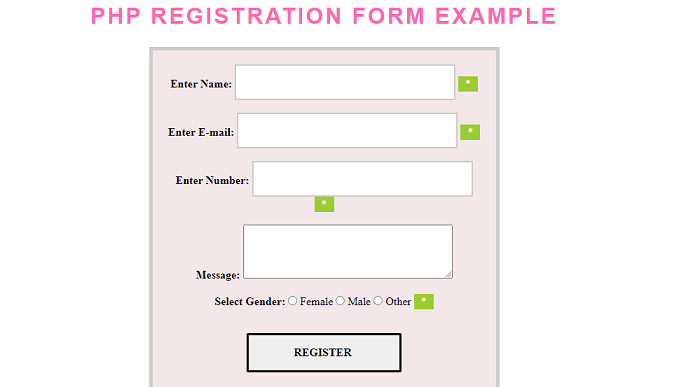
在上面的示例中,我们创建了一个公司注册表单,用户填写了表单中所需的信息。
输出:
以下是此示例的输出:
示例2
<! Doctype html>
<html lang="en">
<head>
  <meta charset="utf-8">
  <meta name="viewport" content="width=device-width, initial-scale=1, shrink-to-fit=no">
  <title> PHP Registration Form </title>
<style>
input[type=radio] { width:20px; }
input[type=checkbox]{ width:20px; }
* {
    padding: 0;
    margin: 0;
    box-sizing: border-box;
}
body {
    margin: 50px auto;
    text-align: center;
    width: 800px;
}
input[type=reset] {
  border: 3px solid;
  border-radius: 2px;
  color: ;
  display: block;
  font-size: 1em;
  font-weight: bold;
  margin: 1em auto;
  padding: 1em 4em;
 position: relative;
  text-transform: uppercase;
}
input[type=reset]::before
{
  background: #fff;
  content: '';
  position: absolute;
  z-index: -1;
}
input[type=reset]]:hover {
  color: #1A33FF;
}
input {
    border: 2px solid #ccc;
    font-size: 1rem;
    font-weight: 100;
    font-family: 'Lato';
    padding: 10px;
}
form {
    margin: 20px auto;
    padding: 20px;
    border: 5px solid #ccc;
    background: #8bb2eafa;
}
h1 {
    font-family: sans-serif;
  display: block;
  font-size: 2rem;
  font-weight: bold;
  text-align: center;
  letter-spacing: 3px;
  color: hotpink;
    text-transform: uppercase;
}
    input[type=submit] {
  border: 3px solid;
  border-radius: 2px;
  color: ;
  display: block;
  font-size: 1em;
  font-weight: bold;
  margin: 1em auto;
  padding: 1em 4em;
 position: relative;
  text-transform: uppercase;
}
input[type=submit]::before
{
  background: #fff;
  content: '';
  position: absolute;
  z-index: -1;
}
input[type=submit]:hover {
  color: #1A33FF;
}
</style>
</head>
<body>
<h1> PHP Registration Form Example </h1>
<form method="post" enctype="multipart/form-data" action =?#?>
<table>
 <tr>
    <td colspan="2"> <?php echo @msg; ?> </td>
 </tr>
  <tr>
    <td width="159"> <b> Enter your Name </b> </td>
    <td width="218">
    <input type="text" placeholder="Enter name" name = "n"  pattern="[a-z A-Z]*" required /> </td>
  </tr>
  <tr>
    <td> <b> Enter your Email </b> </td>
    <td> <input type="email" name="e"/ placeholder= "Enter Email"></td>
  </tr>
  <tr>
    <td> <b> Enter your Password </b> </td>
    <td> <input type="password" name="p"/ placeholder=" Enter Password"></td>
  </tr>
  <tr>
    <td> <b> Enter your Address </b> </td>
    <td> <textarea name="add">  Enter Address </textarea> </td>
  </tr>
  <tr>
    <td> <b> Enter your Mobile Number </b> </td>
    <td> <input type="text" pattern="[0-9]*" name="m" / placeholder=" Enter number"></td>
  </tr>
  <tr>
    <td height="23"> <b> Select your Gender </b> </td>
    <td>
    Male <input type="radio" name="g" value="m"/>
    Female <input type="radio" name="g" value="f"/>
    </td>
  </tr>
  <tr>
    <td> <b> Choose your Hobbies </b> </td>
    <td>
        Cricket <input type="checkbox" value="cricket" name="hobb[]"/>
        Singing <input type="checkbox" value="singing" name="hobb[]"/>
        Dancing <input type="checkbox" value="dancing" name="hobb[]"/>
    </td>
  </tr>
  <tr>
    <td> <b> Select your Profile Pic </b> </td>
    <td> <input type="file" name="pic"/> </td>
  </tr>
  <tr>
    <td> <b> Select your Date of Birth </b> </td>
    <td>
        <select name="mm">
            <option value=""> Month </option>
            <?php            for(i=1;i<=12;i++)
            {
            echo "<option value ='i'>".i."</option>";
            }
            ?>
        </select>
        <select name="dd">
            <option value=""> Date </option>
            <?php
            for(i=1;i<=31;i++)
            {
            echo "<option value ='i'>".i."</option>";
            }
            ?>
        </select>
        <select name="yy">
            <option value=""> Year </option>
            <?php            for(i=1900;i<=2015;i++)
            {
            echo "<option value ='i'>".i."</option>";
            }
            ?>
        </select>
    </td>
  </tr>
  <tr>
    <td colspan="2" align="center">
    <input type ="submit" name="save" value="Register"/>
    <input type="reset" value="Reset"/>
    </td>
  </tr>
</table>
</form>
</body>
</html>
<?php
extract(_POST);
if(isset(save))
{
dob=yy."-".mm."--".dd;
h=implode(",",hobb);
img=_FILES['pic']['name'];
if(return)
{msg="<font color='red'>".ucfirst(e)." already exists choose another email </font>";
}
else
{msg= "<font color='blue'> your data saved </font>";
}
}
?>
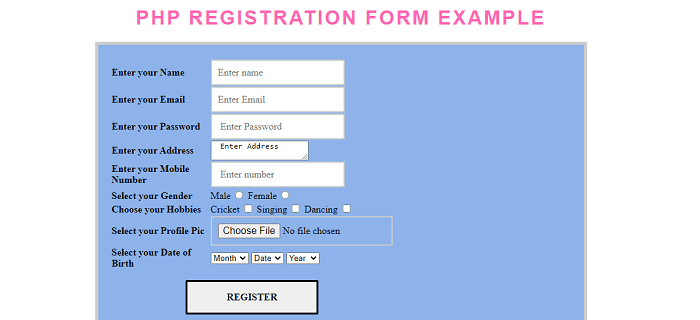
解释:
在上面的示例中,我们使用PHP创建了一个基本的注册表单。
输出:
以下是此示例的输出: