 极客笔记
极客笔记如何在React组件中使用handleChange()函数
handleChange()不是React的内建函数,但从其名字可以看出,我们可以定义它来处理用户在输入框中所做的更改。在React中,我们需要在用户在输入框中输入值时处理输入,以使其可编辑。
在这里,我们将学习如何在单个和多个输入框中使用 handleChange() 函数。
在功能性组件中使用handleChange()函数
在React中,我们可以使用function关键字定义组件并将它们称为功能性组件。在使用功能性组件时,我们可以使用Hooks来管理输入值。
语法
用户可以按照以下语法来使用 handleChange() 函数与功能性组件。
function handleChange(event) {
   let value = event.target.value;
}
<input type = "text" onChange = {handleChange} value = {value} />
在上述语法中,我们使用了onChange事件属性,每当输入值发生更改时,就会调用handleChange()函数。在handleChange()函数中,我们可以使用’event.target.value’获取新的输入值。
示例
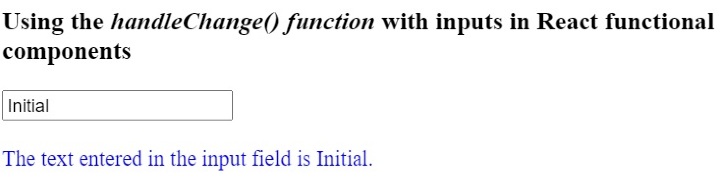
在下面的示例中,我们创建了一个包含文本输入字段的函数组件。同时,我们在函数组件内部添加了handleChange()函数。
在handleChange()函数中,我们获取更新后的输入值,并使用hooks将其设置为value变量的值。同时,我们在输出中显示”value”变量的值。
import React from "react";
import { useState } from "react";

function App() {
   const [value, setValue] = useState("Initial");
   function handleChange(event) {
      // gives the value of the targetted element
      let value = event.target.value;
      setValue(value);
   }
   return (
      <div>
         <h3>
            Using the <i> handleChange() function </i> with inputs in React
            functional components.
         </h3>
         <input type = "text" onChange = {handleChange} value = {value} />
         <br/>   <br/>
         <div style = {{ color: "blue" }}>
            {" "}
            The text entered in the input field is {value}.{" "}
         </div>
      </div>
   );
}
export default App;
输出
示例
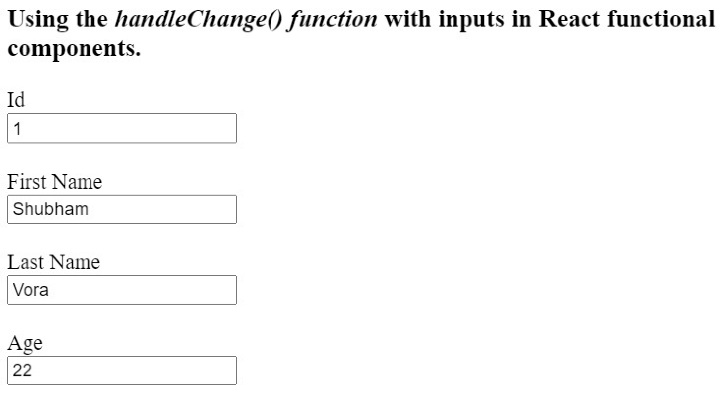
在下面的示例中,我们在单个功能组件中创建了多个输入框。我们使用单个handleChange()函数来处理所有的输入框。在handleChange()函数中,我们可以通过’utilization.target.name’获得输入框的名称,并根据名称使用该函数设置输入值。
用户可以在输入框中输入值,并观察单个handleChange()函数如何处理所有的输入。
import React from "react";
import { useState } from "react";

function App() {
   const [id, setId] = useState("1");
   const [firstName, setFirstName] = useState("Shubham");
   const [lastName, setLastName] = useState("Vora");
   const [age, setAge] = useState(22);
   function handleChange(event) {
      // gives the value of the targetted element
      let value = event.target.value;
      let inputName = event.target.name;
      if (inputName == "id") {
         setId(value);
      } else if (inputName == "fname") {
         setFirstName(value);
      } else if (inputName == "lname") {
         setLastName(value);
      } else {
         setAge(age);
      }
   }
   return (
      <div>
         <h3>
            Using the <i> handleChange() function </i> with inputs in React
            functional components.
         </h3>
         <label for = "Id"> Id </label>
         <br />
         <input type = "text" id = "Id" name = "id" onChange = {handleChange} value = {id} />
         <br /> <br />
         <label for = "fname"> First Name </label>
         <br />
         <input
            type = "text"
            id = "fname"
            name = "fname"
            onChange = {handleChange}
            value = {firstName}
         />
         <br /> <br />
         <label for = "lname"> Last Name </label>
         <br />
         <input
            type = "text"
            id = "lname"
            name = "lname"
            onChange = {handleChange}
            value = {lastName}
         />
         <br /> <br />
         <label for = "age"> Age </label>
         <br />
         <input
            type = "text"
            id = "age"
            name = "age"
            onChange = {handleChange}
            value = {age}
         />
         <br /> <br />
      </div>
   );
}

export default App;
输出
使用handleChange()函数与类组件
我们可以使用ReactJS中的class关键字创建类组件。我们不能在类组件中使用hooks来管理变量。所以,我们需要在类组件中使用state。
此外,每当我们使用handleChange()方法与类组件一起使用时,我们需要在构造函数中绑定该方法。
语法
用户可以按照以下语法使用handleChange()函数与类组件。
handleChange(event) {
   this.state.text = event.target.value;
}
<input onChange = {this.handleChange} name = "text" />
在上面的语法中,我们在输入值发生改变时更新状态值。
示例
在下面的示例中,我们创建了包含输入字段的类组件。我们还在输入字段上添加了handleChage()方法。
每当用户更改输入值时,我们会调用handleChange()方法来更新组件的状态。
import React from "react";

class App extends React.Component {
   constructor(props) {
      super(props);
      this.state = {
         text: "Sample",
      };
      this.handleChange = this.handleChange.bind(this);
   }
   handleChange(event) {
      this.state.text = event.target.value;
   }
   render() {
      return (
         <div>
            <h2>
               {" "}
               Using the <i> handleChange() function </i> in ReactJs with class
               components.{" "}
            </h2>
            <input onChange = {this.handleChange} name = "text" />
         </div>
      );
   }
}
export default App;
输出结果

用户学会了在React的类组件和函数组件中使用handleChange()函数与输入字段。同时,我们还学会了使用单个handleChange()函数来处理多个输入。